More and more I’ve been working in F#. Part of it is needing a REPL in an environment where I can’t use my normal tools. Part of it is that working in a different paradigm changes how I code. Overall, I love the language and learning it has been a blast!
Recently, however, I was listening to a great DNR with Rachel Reese and the subject of Type Providers was raised. They have tradeoffs like anything else, but imagine a fully typed model in a single line of code. Better yet, why don’t we make one?
Before we begin, I’m going to assume you have access to a SQL Server instance, a copy of Visual Studio, and F# installed. If anyone reading this either doesn’t have access or would like help getting set up, please let me know in the comments and I’ll try to assist.
Let’s start with a database. I’ll use Northwind for this example, but any will serve. Next, we need an F# class library project. Let’s call it TypeProviders.
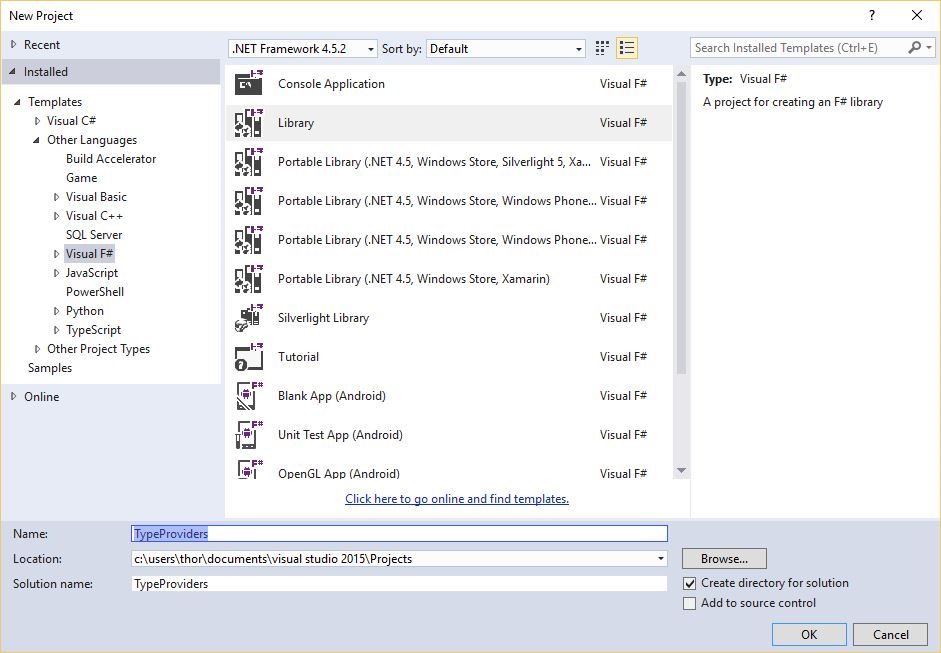
You should start out in a new F# file, with the following:
namespace TypeProviders

type Class1() =
     member this.X = "F#"
Now we need to reference a few assemblies. For now, let’s go with System.Data.Linq, and FSharp.Data.TypeProviders.

Now I have a terrible confession. I lied. If we count open/using/import statements, it’s actually a whopping four lines of code:
namespace TypeProviders

open System.Data.Linq
open Microsoft.FSharp.Data.TypeProviders
open System.Linq

type public NorthwindContext = SqlDataConnection<"Connection-String-Here">
That’s it. You’re done. You now have a strongly typed model of the entire database! Don’t believe me? That’s fair. Let’s explore. Let’s open System.Linq and:
namespace TypeProviders

open System.Data.Linq
open Microsoft.FSharp.Data.TypeProviders
open System.Linq

type public NorthwindContext = SqlDataConnection<"Connection-String-Here">

module WorkingWithProvider =

     // Alias the type so we don't have to reference
     // the full path to the type.
     type Shipper = NorthwindContext.ServiceTypes.Shippers

     // A function which determines whether the
     // passed Shipper is named "Speedy Express"
     let nameIsSpeedy (company: Shipper) =
          company.CompanyName = "Speedy Express"

     // Grab SpeedyExpress from the database
     let speedy = NorthwindContext
                     .GetDataContext()
                     .Shippers
                     .Where(nameIsSpeedy)
                     .Single()
That’s it. We already can grab a particular entity from a particular table and we didn’t need to define a single one of the types. Where you see the type Shipper declared, we’re just aliasing it for readability.
“Ok. Not bad. What else?”
How about having your stored procedures automatically wired up for you?
// Maps directly to the Stored Proc
let getSalesByYear = NorthwindContext
                         .GetDataContext()
                         .SalesByYear
“Ok. That’s pretty cool. Problem is, I’m a C# developer. I can’t use this.”
Why not? It’s all IL, right? Let’s create a C# project called ConsumeTypeProvider:
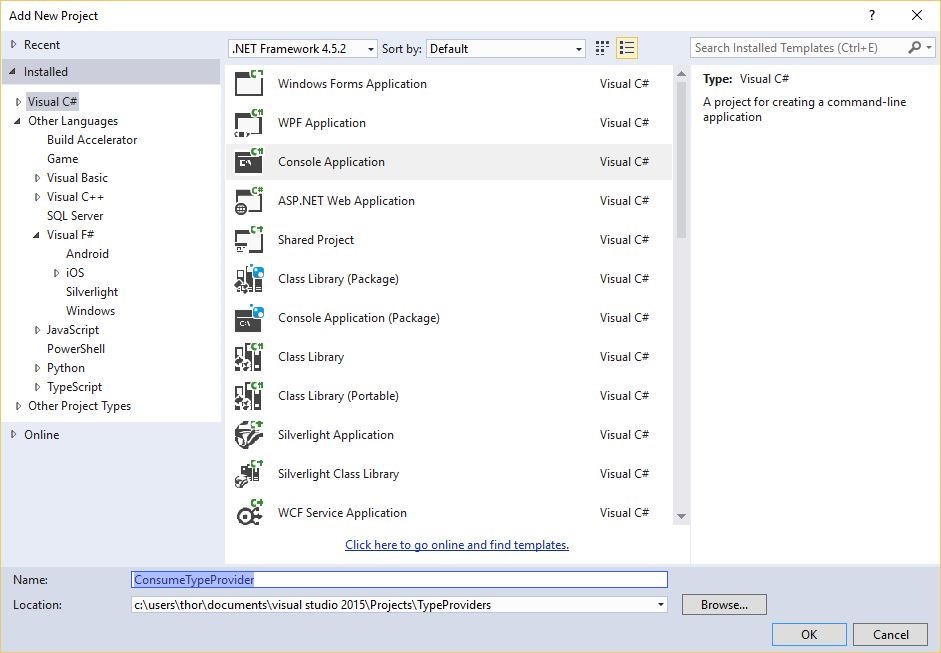
Then we’ll reference our TypeProvider project and System.Data.Linq:
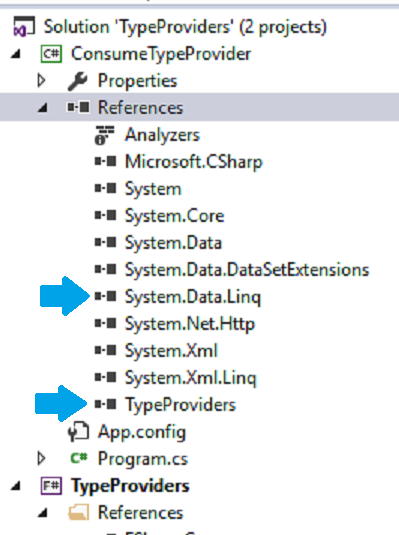
Voila:
static void Main(string[] args)
{
     var db = TypeProviders
                 .NorthwindContext
                 .GetDataContext()

     var speedy = db.Shippers
                    .Where
                    (x => x.CompanyName == "Speedy Express")
                    .Single();
}
“Ok. I can use it. Should I?”
Great question! It depends. Unless you alias the types, you’ll need to reference every type as [TypeProviderName].ServiceTypes.[ActualTypeName]. It’s a bit much.
Also, these aren’t EF Power Tools generated partial classes. Speaking of a bit much. If you want your model to have more functionality than the provided types, you’ll need to subclass them or write adapters, which cuts into the time savings.
“Any gotchas?”
Well, the data-context entities expose the System.Data.Linq.ITable interface. As an EF guy, I’m not a huge fan of the different API. Check back later and I’ll show you the more EF friendly Sql Type Provider.
Also, the Type Provider is, by default, dynamic. Every time you compile, it checks the database. That means compiling will be slower, but not enough that I mind.
You can set the Type Provider to a static schema, but I would advise against it. When dynamically generated each build, your Type Provider is a perfect reflection of your database. If the Type Provider changes its types such that it breaks your application, it means your database has been changed such that it breaks your application. Dynamic type generation can warn you if your database has breaking changes.
“Anything else?”
Yes, sorry. One last thing. There’s a lot more to Type Providers, and just this particular one, than I can show you in a single post. When you have time, there’s more information on MSDN.
 Fun times with Functions