Selenium, just that easy.

I recently needed to set up a workflow for testing the front end of a client’s web app.  We wanted to simulate various users and interact with the system as they would, so Selenium WebDriver was an obvious choice.  I was amazed at how easily I could get up and running without ever having used it before, so I thought a quick intro post would be fun.

For this tutorial I’ll be using the ChromeDriver utility.  You’ll need to ensure you have it to follow along.  Additionally, Selenium will need to find the utility.  It will default to using your PATH variable but in this case I will directly reference the path to the utility.

As a starting point, let’s load up Visual Studio and create a new Console Application.  From there, load up Package Manager Console and enter:

Install-Package Selenium.Support -Version 2.53.1

You can also use the GUI tool to search for Selenium.Support version 2.53.1 if you prefer.  Either way, this installs Selenium.WebDriver for controlling ChromeDriver and Selenium.Support for a set of useful extensions.

Now to get to the meat.  Rather than building yet another, “Hello World,” and using Selenium to verify its functionality, I thought would be fun to automate a common task.  I’ve been dreaming of getting a Subaru WRX for a while now, and I thought I’d run through checking listings on one of the sites I check occasionally.  Without further ado:

open OpenQA.Selenium.Chrome
open OpenQA.Selenium.Support.UI
open System
let pathToChromeDriverUtility = @"C:\WebDrivers\"
let myLocalZip = "29063"
let (|Int|_|) str =
match Int32.TryParse(str) with
| (true,int) -> Some(int)
| _ -> None
let isInt text =
match text with
| Int i -> true
| _ -> false
// If the path to the ChromeDriver executable is not
// part of the path variable, it's easiest to
// simply provide the constructor with the directory
// path.
let driver = new ChromeDriver(pathToChromeDriverUtility)
[<EntryPoint>]
let main argv =
// Load up the cargurus home page.
driver.Navigate().GoToUrl("https://www.cargurus.com&quot;)
// Grab the select element for the make.
let makeSelect = driver.FindElementById("carPickerUsed_makerSelect")
|> SelectElement
// Because I like them.
makeSelect.SelectByText("Subaru")
// Grab the select element for the model.
let modelSelect = driver.FindElementById("carPickerUsed_modelSelect")
|> SelectElement
// Because VROOM VROOM.
modelSelect.SelectByText("WRX")
// Grab the input for the Zip Code where I'll search.
let zipInput = driver.FindElementById("dealFinderZipUsedId")
// Enter my local zip.
zipInput.SendKeys(myLocalZip)
// Grab the search button.
let searchButton = driver.FindElementById("dealFinderForm_0")
// Click it FTW!
searchButton.Click()
(*
This is a quick one off, so we won't be parsing the entire result set.
For now, let's just see what the closest available options are.
We could easily extend this to be far more intelligent, but this
shows the basics well enough.
*)
// Grab the select element for sorting.
let sortBySelect = driver.FindElementById("dealFinder-sortHeader-select")
|> SelectElement
// Order the result set by proximity.
sortBySelect.SelectByText("Closest first")
// Get the distance spans for all listings.
let allDistances = driver.FindElementsByCssSelector("div#listingsDiv span.cg-dealFinder-result-stats-milesAway, div#featuredResultsDiv span.cg-dealFinder-result-stats-milesAway")
let distanceText = allDistances |> Seq.map (fun span -> span.Text.Replace("mi", "").Trim())
distanceText |> Seq.filter (isInt)
|> Seq.map (Convert.ToInt32)
|> Seq.sort
|> Seq.iter (printfn "%i miles away")
driver.Close()
Console.ReadLine() |> ignore
0 // return an integer exit code

If you prefer C#:

using OpenQA.Selenium;
using OpenQA.Selenium.Chrome;
using OpenQA.Selenium.Support.UI;
using System;
using System.Collections.Generic;
using System.Linq;
using System.Text;
using System.Threading.Tasks;
namespace SeleniumCSharp
{
class Program
{
private static string pathToChromeDriverUtility = @"C:\WebDrivers\";
private static string myLocalZip = "29063";
private static bool IsInt(string s)
{
int ignore;
return Int32.TryParse(s, out ignore);
}
static void Main(string[] args)
{
// If the path to the ChromeDriver executable is not
// part of the path variable, it's easiest to
// simply provide the constructor with the directory
// path.
var driver = new ChromeDriver(pathToChromeDriverUtility);
// Load up the cargurus home page.
driver.Navigate().GoToUrl("https://www.cargurus.com&quot;);
// Grab the select element for the make.
var makeElement = driver.FindElementById("carPickerUsed_makerSelect");
var makeSelect = new SelectElement(makeElement);
// Because I like them.
makeSelect.SelectByText("Subaru");
// Grab the select element for the model.
var modelElement = driver.FindElementById("carPickerUsed_modelSelect");
var modelSelect = new SelectElement(modelElement);
// Because VROOM VROOM.
modelSelect.SelectByText("WRX");
// Grab the input for the Zip Code where I'll search.
var zipInput = driver.FindElementById("dealFinderZipUsedId");
// Enter my local zip.
zipInput.SendKeys(myLocalZip);
// Grab the search button.
var searchButton = driver.FindElementById("dealFinderForm_0");
// Click it FTW!
searchButton.Click();
/*
This is a quick one off, so we won't be parsing the entire result set.
For now, let's just see what the closest available options are.
We could easily extend this to be far more intelligent, but this
shows the basics well enough.
*/
// Grab the select element for sorting.
var sortByElement = driver.FindElementById("dealFinder-sortHeader-select");
var sortBySelect = new SelectElement(sortByElement);
// Order the result set by proximity.
sortBySelect.SelectByText("Closest first");
// Get the distance spans for all listings.
var allDistances = driver.FindElementsByCssSelector("div#listingsDiv span.cg-dealFinder-result-stats-milesAway, div#featuredResultsDiv span.cg-dealFinder-result-stats-milesAway");
var distanceText = allDistances.Select(span => span.Text.Replace("mi", "").Trim());
var orderedDistances = distanceText.Where(IsInt)
.OrderBy(text => Convert.ToInt32(text));
foreach (var dist in orderedDistances)
Console.WriteLine($"{dist} miles away");
driver.Close();
Console.ReadLine();
}
}
}

The sky’s the limit from here.  You can do much more complex and involved workflows and combining it with unit testing is a breeze.  Please, let me know if you’d like more posts on this subject.

Lastly, a disclaimer.  I’m not trying to advertise for cargurus, nor am I advocating scraping their or any site.  This is just meant to be a fun display of the power of Selenium WebDriver.  It can help you nail down your UI testing, or it could just start your favorite websites when you boot your PC.  Just remember, don’t be evil.

ngrok is awesome!

I don’t know if I’m the last one to the party, but if you haven’t checked out ngrok, do yourself that favor!

In short, ngrok is a secure tunneling application which lets you expose a web application publicly with essentially zero setup.  You can always configure a server, deploy to the server, test against the server, read the logs… 

If you want a faster process, download and unzip ngrok, then run this on the command line:

X:\ngrok> ngrok http [port]

Then get on with your life.  ngrok will generate a custom [http/https]://*******.ngrok.io subdomain for your process and you can connect immediately.  Best of all, it’s free!  There are paid plans, and they’re well worth the low price IMHO.

If you’re using IIS Express, you’ll want to include a host header command:

X:\ngrok> ngrok http [port] -host-header=”localhost:[port]”

TL;DR, this is required due to the default binding information in IIS Express.  Thanks to, and please check out, Devin Rader’s excellent write-up for a better explanation as well as alternate methods of working with IIS Express and ngrok!

Grokking a Legacy Database

Just a quick note today.  Thought I’d share one of my favorite queries for getting to know a legacy database.

Now, we all know that legacy databases are always comprehensively documented, and we never forget where we put that documentation, and the author of the documentation can always predict exactly what you need to know about the database…  but for those of us who live in a world where good practices and intentions don’t universally lead to perfect results:

SELECT
[col].[TABLE_NAME],
[col].[COLUMN_NAME],
[col].[DATA_TYPE],
[col].[CHARACTER_MAXIMUM_LENGTH],
[col].[IS_NULLABLE],
[con].[CONSTRAINT_NAME]
FROM [INFORMATION_SCHEMA].[COLUMNS] AS [col]
LEFT JOIN [INFORMATION_SCHEMA].[CONSTRAINT_COLUMN_USAGE] AS [con]
ON [col].[TABLE_NAME] = [con].[TABLE_NAME]
AND [col].[COLUMN_NAME] = [con].[COLUMN_NAME]
WHERE [col].[TABLE_NAME] LIKE '%%'

Database diagrams make for a nice 5,000 ft. view, but when I’m ready to try to understand a single table nothing beats a quick and simple view of the basic column data.

A view of information returned from the above Gist, when targeting the Employee table in Microsoft's Northwind database.

Just looking at the results for Microsoft’s Northwind database’ Employee table, I know; the Primary Key is EmployeeId, the BirthDate column is a datetime and has a check constraint which is worth investigating, the general structure of the data, and I can intuit that the column ReportsTo, with the Foreign Key constraint FK_Employees_Employees, is likely a cyclic key linking one employee to another in a management hierarchy.

Not bad for a single query.

What’s so good about immutability?

When I first started learning functional programming, immutability was one of the great looming walls which I encountered.  I kept looking for some deep and complex reason that variables shouldn’t mutate, when in fact, the reason is very, very simple.  Immutable variables make code more predictable.

Let’s say you and I, and ten others are seated in a circle.  You need to pass a message to everyone, but you can’t do it by speaking.  “Aha,” you declare.  “I’ll write a note, and everyone can pass it down!”  If I asked you at this point whether you’d like the note laminated, what would your response be?

My guess is, you’d answer, “No, thanks.  It’s just going around the circle.”  Seems pretty reasonable, when you’re just making sure 11 people get the same message, especially if you know and trust them.  What if you needed to pass the note to a thousand people, or ten thousand?  The note might get ripped, smudged, or some troll might deliberately change it.

Laminating the message ensures that everyone gets the same message, and that is where immutability becomes powerful.  Know what the difference is between this:

var message = "This is a message.";
logger.Log(message);
var messageInQuotes = "\"" + message + "\"";

and this?

let message = "This is a message."
logger.Log message
let messageInQuotes = "\"" + message + "\""

The difference is that we can only predict the value of messageInQuotes in the second code example.  In the C# example, once the message variable is passed into the Log method, you are allowing it or any methods it calls to change the state of the message.  With immutable variables, you can predict the state of messageInQuotes.

This may not seem earth-shaking or profound, and that’s because it isn’t.  Like the best things in programming, it’s incredibly simple.  If you’re writing a ten-line console app, who cares about mutability?  When you’re working with ten-million lines of code, event-driven asynchronous processing, and multi-threading (or as I like to call it, enterprise development), you might want to care. 

Going back to our analogy of ten-thousand people all getting the same message, you don’t have to assume there’s a bad egg.  People make mistakes all the time.  Maybe the message was, “There’s a party on Fulton St,” and someone thought, “I don’t know a Fulton St.  You must have meant Fuller St.  I’ll fix it for you and pass it on.”  Only with software, it’s that one errant function.

I’m not trying to say that C# is bad, or that F# is better.  Both C# and F# offer mutability and immutability.  With any language, enterprise-scale development is complicated and complexity reduces predictability, which in turn reduces reliability.  Immutability can help your code to be more predictable, and (IMHO) more readable. 

In closing, look at the following code.  Assuming we want to get the reversed value of an original string, is it clearer to pass the string to a function which will reverse it, or to pass it into a method which will return the reversed value and then assign that value to a new variable?

// relying on mutability
public void ReverseString(string forwards)
{
var chars = forwards.ToCharArray();
Array.Reverse(chars);
forwards = new String(chars);
}
ReverseString(message);
// immutable implementation
public string ReverseString(string forwards)
{
var chars = forwards.ToCharArray();
var reversedChars = chars.Reverse().ToArray();
return new String(reversedChars);
}
reversedMessage = ReverseString(message);

Kill it with fire!

Part of the reason I haven’t written anything lately, is that I just built the gaming PC I’ve been waiting to get for the past 3+ years.  After waiting that long, I’m making good use of it!

One of the first things I did was to boot up Fallout 4 and explore the wastes…  Until it crashes, of course.  Not sure what it is about the series, but I always end up playing for a random amount of time before the game crashes and locks up my system, in this case allowing me to see all my applications, but not view the actual windows.

PowerShell to the rescue!

  After the latest crash, I found myself staring at my computer thinking, “Really?  I can open task-manager, I just can’t interact with it using a mouse, so I can’t kill Fallout!  Wait a minute…  Since when do I need a mouse?”

Get-Process | Where-Object { $_.ProcessName -like '*fall*' } | Stop-Process

Fortunately, Fallout has a fairly distinct process name.  Next time someone’s software tries to eat your computer, don’t get mad.  Kill it with fire!  (Fire, or PowerShell.  Please note: PowerShell is probably far less destructive in the long-run.)

Update:

For the busy developer who just doesn’t have time to enter all those characters, the shorthand is much simpler:

gps '*fall*' | kill

option:checked, not [selected].

Just a quick note.  I’m not sure if this is just me, but until recently I’ve only interacted with the option element by checking for a [selected] attribute.  This caused me no end of problems when dealing with the excellent bootstrap-select library.

Once the element is loaded into the DOM, the [selected] attribute is not how you need to check the state of an option, or query for options.  To query for options which have been selected by the user, use the :checked pseudo-class selector, just as you would with a radio or checkbox input.

F# Type Providers: 0 to Data in a Single Line of Code

More and more I’ve been working in F#.  Part of it is needing a REPL in an environment where I can’t use my normal tools.  Part of it is that working in a different paradigm changes how I code.  Overall, I love the language and learning it has been a blast!

Recently, however, I was listening to a great DNR with Rachel Reese and the subject of Type Providers was raised.  They have tradeoffs like anything else, but imagine a fully typed model in a single line of code.  Better yet, why don’t we make one?

Before we begin, I’m going to assume you have access to a SQL Server instance, a copy of Visual Studio, and F# installed.  If anyone reading this either doesn’t have access or would like help getting set up, please let me know in the comments and I’ll try to assist.

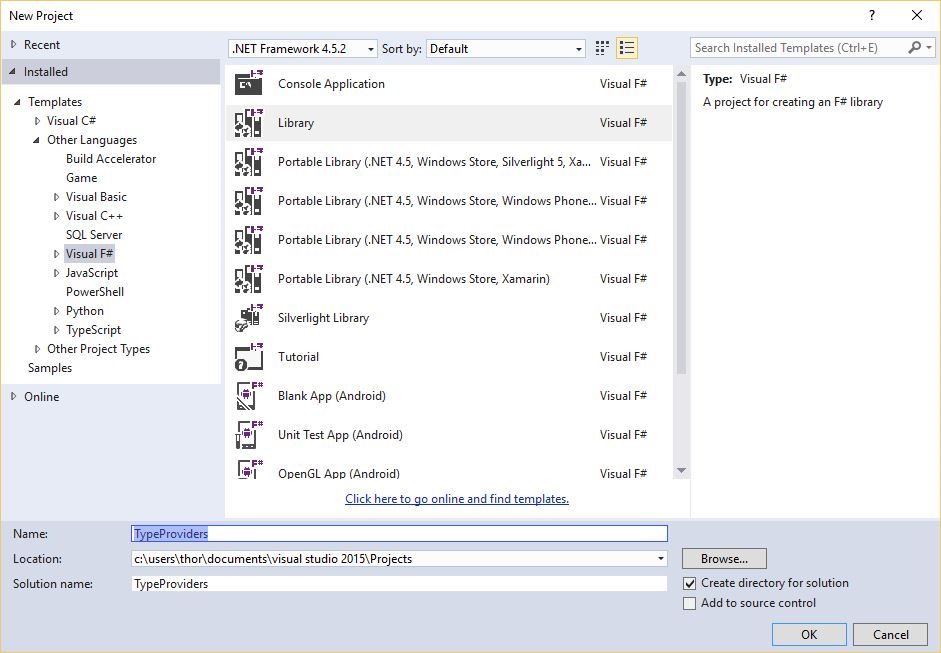
Let’s start with a database.  I’ll use Northwind for this example, but any will serve.  Next, we need an F# class library project.  Let’s call it TypeProviders.

A picture of the new project dialog in VS 2015.  We're using an F# library project and calling our project TypeProviders.

You should start out in a new F# file, with the following:

namespace TypeProviders

type Class1() =
     member this.X = "F#"

Now we need to reference a few assemblies.  For now, let’s go with System.Data.Linq, and FSharp.Data.TypeProviders.

An image indicating the two references; System.Data.Linq, and FSharp.Data.TypeProviders.


Now I have a terrible confession.  I lied.  If we count open/using/import statements, it’s actually a whopping four lines of code:

namespace TypeProviders
 
open System.Data.Linq
open Microsoft.FSharp.Data.TypeProviders
open System.Linq
 
type public NorthwindContext = SqlDataConnection<"Connection-String-Here">

That’s it.  You’re done.  You now have a strongly typed model of the entire database!  Don’t believe me?  That’s fair.  Let’s explore.  Let’s open System.Linq and:

namespace TypeProviders
 
open System.Data.Linq
open Microsoft.FSharp.Data.TypeProviders
open System.Linq
 
type public NorthwindContext = SqlDataConnection<"Connection-String-Here">
 
module WorkingWithProvider =

     // Alias the type so we don't have to reference 
     // the full path to the type.
     type Shipper = NorthwindContext.ServiceTypes.Shippers

     // A function which determines whether the 
     // passed Shipper is named "Speedy Express"
     let nameIsSpeedy (company: Shipper) =
          company.CompanyName = "Speedy Express"

     // Grab SpeedyExpress from the database
     let speedy = NorthwindContext
                     .GetDataContext()
                     .Shippers
                     .Where(nameIsSpeedy)
                     .Single()

That’s it.  We already can grab a particular entity from a particular table and we didn’t need to define a single one of the types.  Where you see the type Shipper declared, we’re just aliasing it for readability. 

“Ok.  Not bad.  What else?” 

How about having your stored procedures automatically wired up for you?

// Maps directly to the Stored Proc
let getSalesByYear = NorthwindContext
                         .GetDataContext()
                         .SalesByYear

“Ok.  That’s pretty cool.  Problem is, I’m a C# developer.  I can’t use this.” 

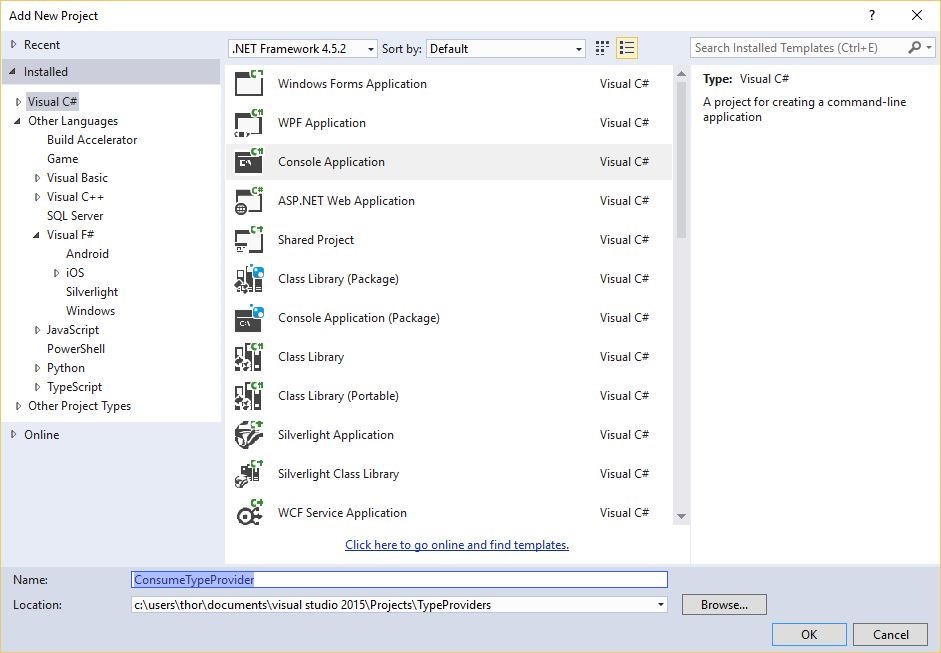
Why not?  It’s all IL, right?  Let’s create a C# project called ConsumeTypeProvider:

A picture of the NewProject window, with a CSharp console project selected, and the name ConsumeTypeProvider.

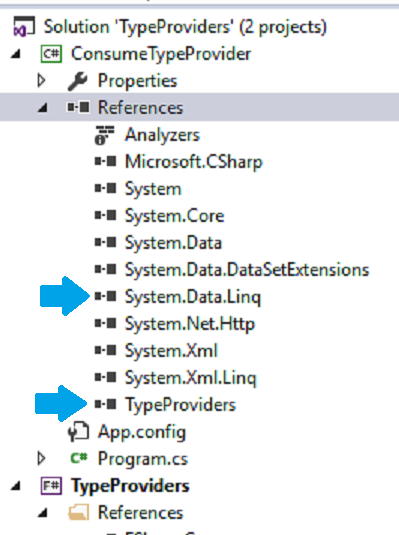
Then we’ll reference our TypeProvider project and System.Data.Linq:

An image showing that the new C Sharp project ConsumeTypeProviders, references the F Sharp project TypeProviders, and System.Data.Linq.

Voila:

static void Main(string[] args)
{
     var db = TypeProviders
                 .NorthwindContext
                 .GetDataContext()

     var speedy = db.Shippers
                    .Where
                    (x => x.CompanyName == "Speedy Express")
                    .Single();
}

“Ok.  I can use it.  Should I?” 

Great question!  It depends.  Unless you alias the types, you’ll need to reference every type as [TypeProviderName].ServiceTypes.[ActualTypeName].  It’s a bit much.

Also, these aren’t EF Power Tools generated partial classes.  Speaking of a bit much.  If you want your model to have more functionality than the provided types, you’ll need to subclass them or write adapters, which cuts into the time savings.

“Any gotchas?” 

Well, the data-context entities expose the System.Data.Linq.ITable interface.  As an EF guy, I’m not a huge fan of the different API.  Check back later and I’ll show you the more EF friendly Sql Type Provider.

Also, the Type Provider is, by default, dynamic.  Every time you compile, it checks the database.  That means compiling will be slower, but not enough that I mind. 

You can set the Type Provider to a static schema, but I would advise against it.  When dynamically generated each build, your Type Provider is a perfect reflection of your database.  If the Type Provider changes its types such that it breaks your application, it means your database has been changed such that it breaks your application.  Dynamic type generation can warn you if your database has breaking changes.

“Anything else?”

Yes, sorry.  One last thing.  There’s a lot more to Type Providers, and just this particular one, than I can show you in a single post.  When you have time, there’s more information on MSDN.

InternalsVisibleTo

Just a quick tip.  Every once in a while, you’ll need to share code between specific assemblies, and only those assemblies.  A common example is when you want to strap a test-harness to an object, but not publicly expose the type.

/// <summary>
/// Vital component.
/// </summary>
/// <remarks>
/// Ensure stability but don't publicly expose.
/// </remarks>
internal static class CriticalComponent
{
}

Sometimes you just need to expose an object, type, or method to another specific assembly.  Fortunately, you can!

using System.Reflection;
using System.Runtime.CompilerServices;
using System.Runtime.InteropServices;
 
// Allow ExampleAssembly.Tests to test internals
[assembly: InternalsVisibleTo("ExampleAssembly.Tests")]
 
// General Information about an assembly is controlled 
// through the following set of attributes. Change 
// these attribute values to modify the information
// associated with an assembly.
[assembly: AssemblyTitle("ExampleAssembly")]

Check out the MSDN for full details.  It’s a handy thing when you need it.  Oh, and remember to put your assembly attributes in your AssemblyInfo file.

Something put between the foot and the shoe.

Since my very first app in C#, I’ve felt a bit like an, admittedly boring, non-conformist.  It started at DeVry with the traditional Hello World project, for which I received a whopping 0 of 100.  When I asked the professor how on earth a functioning program which fully matched the project requirements could be a complete failure, the professor explained that I failed for not having comments.

Apparently, the following program is so vastly complicated as to be incomprehensible without the accompanying green text.

public static void Main(string[] args)
{
// Writes "Hello World" to the console.
Console.WriteLine("Hello World");
}

Now the professor, you, and I all know that the comment doesn’t really help in this case.  What’s important is, it reinforces the good habit of commenting your code.  Really though, how good a habit is it?

One of my favorite stories from the excellent show QI, is the line about Samuel Johnson’s definition for, “sock.”  You guessed it, “Something put between the foot and the shoe.”  Astonishing in it’s clarity, right?  Imagine you have no idea what a sock is.  How many possible items could it be?  What material is used to make it?  Most importantly, why are you putting it between the foot and the shoe?!

Without knowing what purpose the object serves, how are we to use it correctly?  Yet, I consistently see definitions such as this in comments, or worse yet, the dreaded:

/// <summary>
/// Sock
/// </summary>
public Sock Sock { get; set; }
view raw SimpleSock.cs hosted with ❤ by GitHub

Surely you jest!  You mean to say that a property of type Sock, which you have named “Sock”, is a… Sock?!  No!

So what’s my point?  Not everyone’s a wordsmith.  Too true.  I struggle with comments all the time.  My point is that we need to stop teaching new developers to mindlessly shove green text in their code.  Where code and comments fail to add value, they reduce value.  Every line read which does not enhance understanding, is a delay and a distraction on the path to grokking the solution.

If you can’t find a better descriptor for your field/property/method than the name itself, don’t bother putting in a comment.  It just takes up space on your and my screen.

That said, try to leave useful comments which add value.  If you’re using a little-known class, or a hot new open-source library, add a link to a good tutorial or the github page.  Give the next guy a resource.  If you can’t think of a way to add clarity to a property declaration, work on something else.  Grab a coffee.  Come back to it when the code is stale enough in your own mind that you can see what I’ll see.  That would be the giant, “What in the Sam Hill is a Metaphor<string>?

Most of all, if the comment won’t add value, don’t write it.  Comments aren’t there to please the professor, or Ms. Manners, or the standards committee.  They’re there to help the next developer use your awesome tool.  Oh, and remember, Dr. Johnson was a brilliant scholar.  Even his definitions weren’t always perfect.

On a final note, I leave you my definition of a sock:

/// <summary>
/// A cloth sleeve which protects and insulates a foot.
/// </summary>
/// <remarks>
/// A sock is generally a cloth tube with only one open
/// end. It is worn over the foot and can help to keep
/// the foot warm in cold weather, as well as prevent
/// chafing when worn between the foot and a shoe, boot
/// or similar garment.
/// </remarks>
/// <example>
/// This shows the basic use of a sock. Please remember,
/// the sock is worn over the foot and under the shoe.
/// <code>
/// class Foot
/// {
/// public Sneakers Shoes { get; set; }
/// public Socks Socks { get; set; }
///
/// public void DonShoes()
/// {
/// this.DonSocks(this.Socks);
/// this.ShoesWorn = true;
/// }
///
/// public void DoffShoes()
/// {
/// this.DoffSocks(this.Socks);
/// this.ShoesWorn = false;
/// }
/// }
/// </code>
/// </example>
public class Sock
{
}
view raw MySock.cs hosted with ❤ by GitHub